---
title: "I built an interface for tmux, and I called it muxo"
description: "A dashboard for the tmux sessions running your coding agents. It answers one question, what is running and who needs me, refuses to do anything else, and is honest about the part that is still missing."
date: 2026-08-10
tags: [ai, agents, tools, build-in-public]
url: "https://mahdif.com/blog/i-built-an-interface-for-tmux-and-i-called-it-muxo/"
---
# I built an interface for tmux, and I called it muxo
A dashboard for the tmux sessions running your coding agents. It answers one question, what is running and who needs me, refuses to do anything else, and is honest about the part that is still missing.
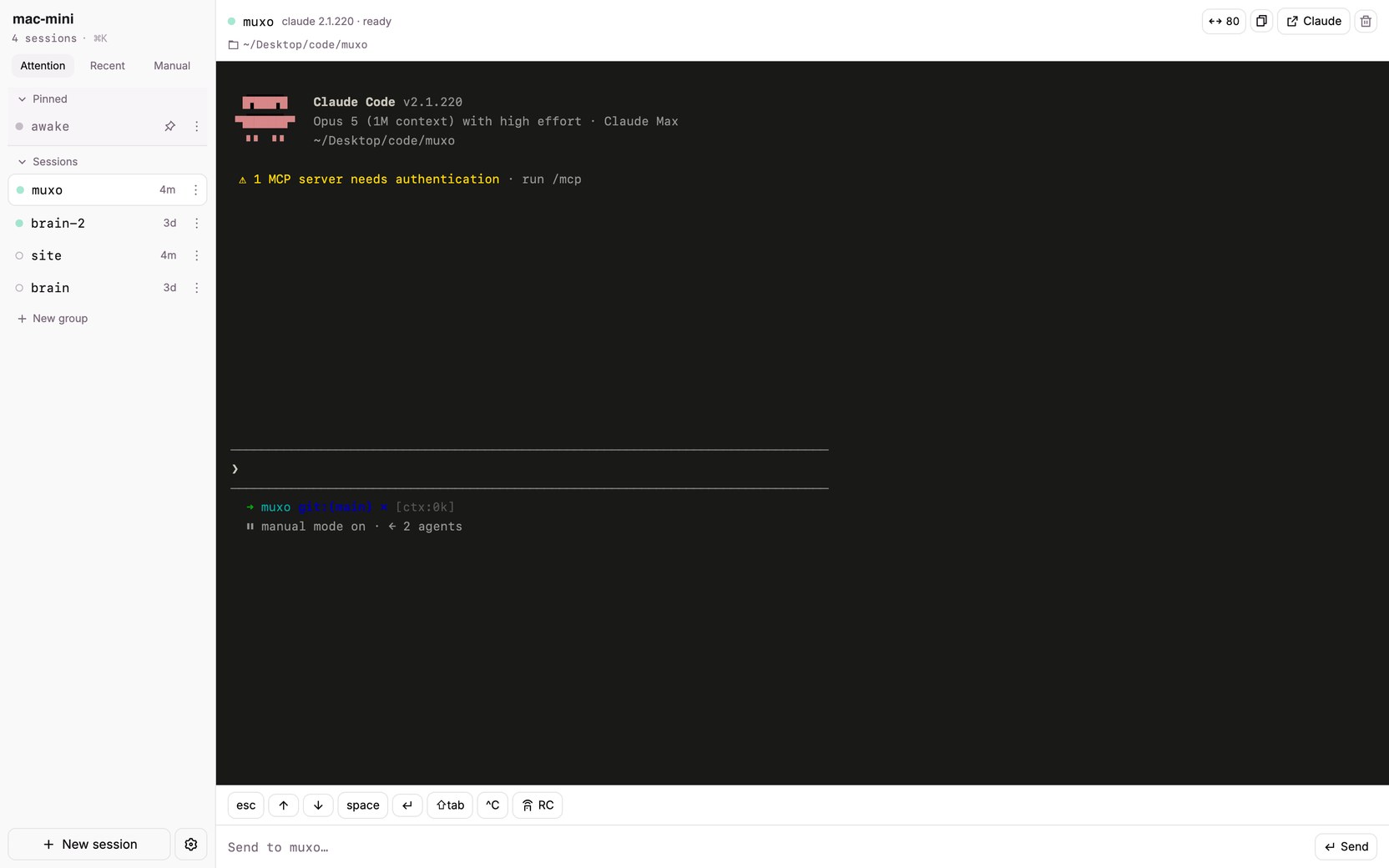
muxo is a dashboard for the tmux sessions on your machine, especially the ones running coding agents. It answers one question: what is running, and who needs me?
It runs entirely on your own machine, and the code is at [github.com/MahdiF/muxo](https://github.com/MahdiF/muxo), MIT licensed.
Last week I wrote about [the setup it came out of](/blog/my-laptop-is-closed-and-the-agents-are-still-working/): a Mac mini that never sleeps, agents working in tmux sessions, a phone as the remote. This post is about the tool itself, and about the use case that made it worth building rather than just worth wanting.
## What you see
One list, sorted so whatever wants you is at the top. Amber is blocked on a prompt. Green is mid turn. Faint green is idle at its prompt. An outline is a plain shell.
Four states. The whole interface is one question answered by colour.Every session on the machine, and what each one is doing, without attaching to any of them.
Pick a session and you get a live read only mirror with a key bar that clears most prompts in a tap or two. When a session needs real attention, one tap flips it into remote control and you pick it up in the Claude app.
## The reason it is not redundant
The fair question is why this is not just the Claude app. Claude Code has had remote control for a while, and for one conversation it is better than anything I would build. I said so in the last post and I meant it.
The answer is that a session is not the unit I care about. The machine is.
Here is the problem that is actually driving this. I am on the highest Max tier and I am burning through the weekly limit faster than I expected to. So I have started experimenting with Codex and Gemini, not because I am unhappy with Claude, but because work that is sitting blocked on a limit is work that is not moving.
tmux is what makes that practical. You can have Claude Code start a task in a new tmux window running a different agent entirely, read what it printed, and pick the thread back up. The substrate does not care which vendor is in the pane, so neither does the list. Anything running in tmux shows up in muxo, whoever started it.
Remote control is excellent, and it is one conversation at a time. Once more than one thing is running, something has to show you the whole machine. That is the job muxo took.
## What it deliberately is not
A chat renderer, because claude.ai/code already does that well. A full terminal, because your SSH client already does that well. Multi user, multi host, or a cloud service, because it is one person and one machine on purpose.
Deciding what muxo would refuse to do took longer than building what it does, and every one of those lines is a feature I would have built badly.
## The security part, plainly
muxo types into real terminals. That is remote command execution, on purpose, because that is the point.
So it binds to localhost by default and refuses to start on any reachable address unless you set a token. It also turns away cross-origin and non-JSON API calls, because loopback is not a wall against the web: every browser tab on your machine can reach `127.0.0.1` too. Treat exposing it exactly the way you would treat exposing SSH.
## What it does not do yet
The honest limit is in the status colours. Every tmux session is listed whatever is running in it, but the part that decides *blocked* from *working* only understands Claude Code right now. It recognises Claude by a regular expression for digits and dots, because Claude Code's process name is its version number. Put Codex or Gemini in a pane and muxo will show it as running and never turn it amber.
So the multi vendor version of this is half built. The list is honest, the colours are not yet, and that is the next thing worth doing.
It does not orchestrate anything either. muxo shows you the board. Deciding which agent takes which task, and how they hand off, is still me typing instructions, and I am not convinced tmux is the final shape of that. I am watching what the multi agent tools do here, and if one of them makes muxo unnecessary I will say so and use it.
What I can defend is narrower. If you already have agents running in tmux, you currently cannot see them, and this is the smallest thing that fixes it.
## Try it
```
npx github:MahdiF/muxo
```
You need tmux and Node 22 or newer. It builds on the first run and prints a URL. There is nothing to configure. It finds your usual code folders on its own.
The source, the issues, and the README that says all of this more bluntly are at [github.com/MahdiF/muxo](https://github.com/MahdiF/muxo).